Built with ADHD in mind
Buildable began when a parent who builds software for a living made it for his own teenage son, who has ADHD, because school-style learning was not working for him. So we built it around what makes learning hard for many people with ADHD: short steps, one clear next thing to do, no pressure, and nothing lost by stopping. This page sets out each choice and the reason for it, for parents and for special educational needs coordinators.
Last updated
What did we design, and why?
Everything here is in the product today. Each choice designs out something that many people with ADHD find makes learning harder.
Short steps with one idea each
A mission is split into 8 to 12 small steps, and only one step is on screen at a time.
Why: A long page asks you to hold a lot in your head at once. One step asks for one thing.
One clear next thing to do
The dashboard shows a single next mission with one button to start it, and every step ends with one button to the next.
Why: Deciding where to begin can be the hardest part of starting.
No timers, streaks, countdowns or scores
Nothing is timed, nothing counts down, there is no daily streak to keep and no score or leaderboard. Tries are unlimited.
Why: Pressure to keep up, or a broken streak, is a common reason people give up altogether.
Stop after any step, carry on from the same place
Progress is saved after every step. A mission opens again at the step where the learner stopped, on any device.
Why: Stopping should never cost anything, so a short session is always worth starting.
A step strip that shows what is coming
A row of markers at the top of each mission shows every step, where the learner is, and what kind of step comes next: reading, a question or code.
Why: Knowing what is ahead makes a task easier to start and to finish.
Immediate, specific feedback when code runs
Code runs in the page the moment it is checked, and each check says in plain words what passed and what it is still looking for.
Why: Quick, specific feedback keeps the gap between trying something and knowing whether it worked short.
Hints before answers
Every coding step has a ladder of hints, gentlest first. The AI mentor never writes out the solution.
Why: Getting unstuck with a nudge, rather than being handed the answer, is what builds the confidence to try the next one.
Something real, early
The first coding mission ends with a real web page, and every unit adds a chapter to a project the learner chose, set in a world of their own.
Why: Many people find it easier to stay with something when the result is theirs and they can see it.
Narration and a simpler explanation
Every reading step has recorded narration and an "explain it more simply" button.
Why: Some people take in an idea better by listening, or from a second, plainer version of it.
Text, font and look the learner controls
Larger text, an easier-to-read typeface, and a calm look with nothing moving, each switched on or off by the learner.
Why: What helps one person concentrate distracts another, so the learner chooses.
A menu that shows what is locked and what opens it
Places that are not open yet stay in the menu, greyed, and pressing one says exactly what opens it.
Why: A hidden or unexplained rule is frustrating. A stated one is something to aim for.
Awards that can never be lost
Awards are for finishing things, never for speed or for coming back every day, and an award once earned is kept.
Why: Losing something you earned feels like a punishment, and that is not what a break should feel like.
A mentor that gives one small next step
When a learner asks the AI mentor for help, it gives the next small step: where to look first, then the idea to use, then a short example that is different from the exercise.
Why: A full explanation at the moment you are stuck can be too much to take in at once.
- 1. ReadA page is made of elements
- 2. Quick questionWhich line is a complete paragraph element?
- 3. ReadThe skeleton every page has
- 4. Put in orderPut these lines in the order they appear in a page.
- 5. Write codeFill the body
- 6. Fill the gapFinish the element so the heading closes properly.
- 7. Write codeChange the tab title
- 8. ReflectIn your own words
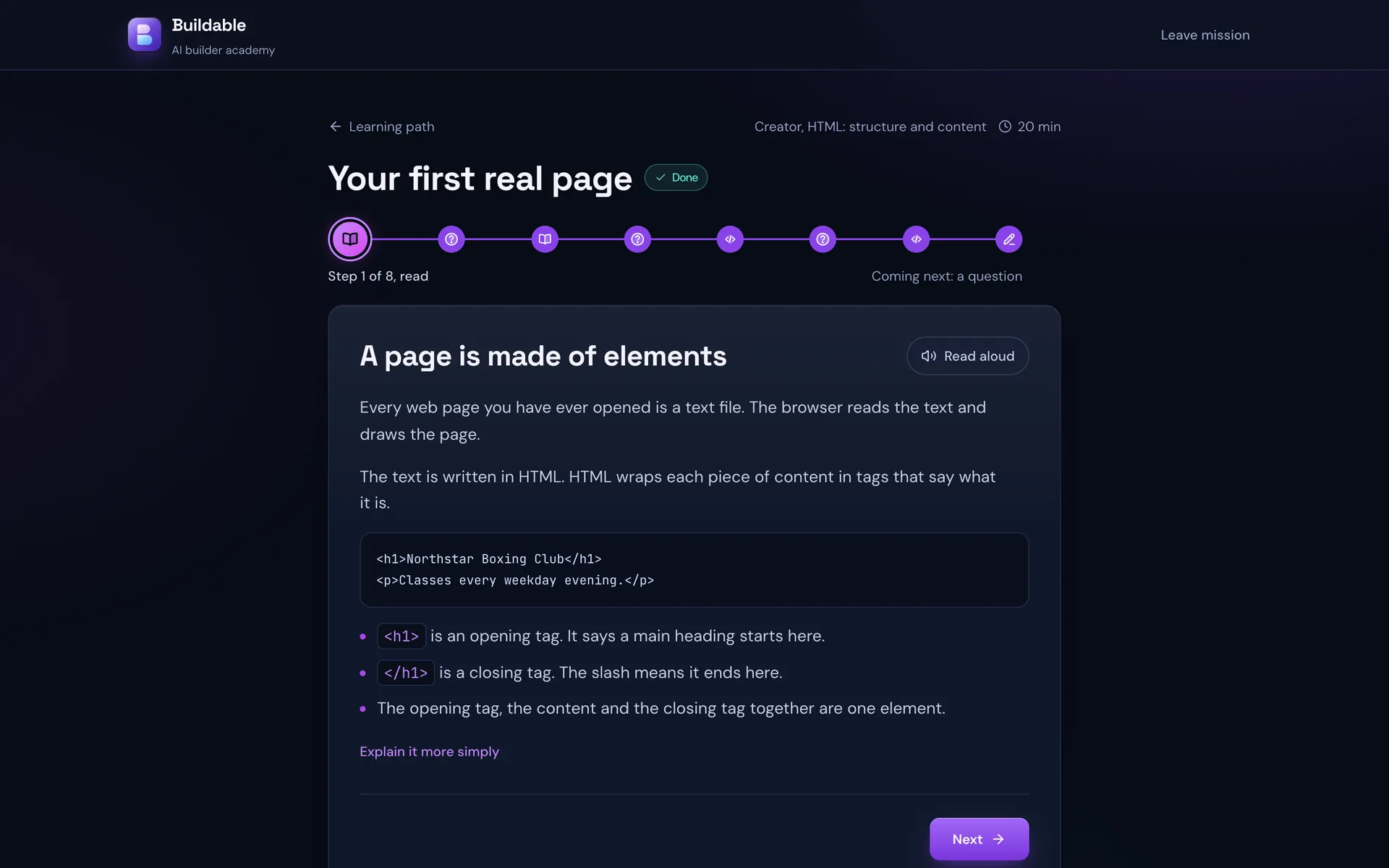
The real steps of one mission, in order, and the first of them as a learner sees it: one idea on screen, the steps ahead shown above it, and buttons to hear it read aloud or explained more simply.
Is Buildable only for learners with ADHD?
No. These design choices suit most learners, whether or not they have ADHD, and Buildable is for any teenager aged 14 to 16 who wants to build software. Nothing in it is a separate mode or a special version.
What Buildable is not
We are not clinicians. This is a design approach, not a treatment, and it makes no claim about any medical or educational outcome. Every learner is different, and what suits one teenager may not suit another.
It has not been tested with, reviewed by or endorsed by any clinician, charity, school or study.
Do we record anything about a learner's health?
No. Buildable never asks about, records or stores any learner's diagnosis or health information, and nothing in the product labels a learner. Inside the product there is no mention of ADHD at all: it is the same programme for everyone. What we do hold.
Questions people ask
Is Buildable suitable for a teenager with ADHD?
It was designed with ADHD in mind, by a parent whose son has ADHD. We cannot promise it will suit every teenager, because every learner is different, and we are not clinicians. The design choices on this page are the best way to judge whether it might suit your child.
Does my child need a diagnosis to use it?
No. Buildable is for any young person aged 14 to 16 who wants to learn to build software. Nobody is asked whether they have a diagnosis, and the programme is the same for everyone.
Does Buildable record my child's diagnosis?
No. Buildable never asks about, records or stores any learner's diagnosis or health information, and nothing in the product labels a learner. Please do not include health information when you contact us.
How long is each session?
As long as suits them. A mission takes between 15 and 40 minutes, about 30 on average, and is made of short steps. A learner can stop after any step, so a session can be a single step or several missions. Nothing is timed.
What happens if they stop halfway?
Nothing is lost. Progress is saved after every step, and the mission opens again at the same step, on any device. There is no streak to break and no award to lose.
Has Buildable been tested with clinicians or schools?
No. It has not been tested with, reviewed by or endorsed by any clinician, charity, school or study. Buildable is new. The lesson text was written with AI and is being reviewed by people, and we are improving it with the schools and families who try it.
Try it with your family or school
Families can register their interest in an account, and schools can talk to us about a free pilot. Please do not include any health information about your child when you write.
Our contact address is being set up and will appear here shortly. Please check back soon.